Run Kafka Streams Demo Application
运行Kafka Streams示例应用程序
This tutorial assumes you are starting fresh and have no existing Kafka or ZooKeeper data. However, if you have already started Kafka and ZooKeeper, feel free to skip the first two steps.
本教程假定您是新手并且没有现成的Kafka和Zookeeper数据。反之,如果您已经使用过Kafka和Zookeeper,请随时跳过前两个步骤。
Kafka Streams is a client library for building mission-critical real-time applications and microservices, where the input and/or output data is stored in Kafka clusters. Kafka Streams combines the simplicity of writing and deploying standard Java and Scala applications on the client side with the benefits of Kafka's server-side cluster technology to make these applications highly scalable, elastic, fault-tolerant, distributed, and much more.
Kafka Streams是一个将输入或输出的数据存储于Kafka集群中,用于构建任务关键型实时应用程序和微服务的客户端库。Kafka Streams结合了在客户端编写和部署标准Java和Scala应用程序的简单性以及Kafka服务器端集群技术的优势,使这些应用程序具有高度可伸缩性,弹性,容错性,分布式等特性。
This quickstart example will demonstrate how to run a streaming application coded in this library. Here is the gist of the WordCountDemo example code (converted to use Java 8 lambda expressions for easy reading).
本快速入门示例将演示如何运行一个使用该库编码出来的流式应用程序。以下是WordCountDemo示例代码的要点(转换为使用Java 8 lambda表达式编码以便轻松阅读)。
// Serializers/deserializers (serde) for String and Long types
// 字符串和长整形类型的序列化器/反序列化器(serde)
final Serde<String> stringSerde = Serdes.String();
final Serde<Long> longSerde = Serdes.Long();

// Construct a `KStream` from the input topic "streams-plaintext-input", where message values
// represent lines of text (for the sake of this example, we ignore whatever may be stored
// in the message keys).
// 从输入主题“streams-plaintext-input”中构造一个'KStream`,其中消息值表示文本行(在本示例中,我们忽略可能存储在消息键中的任何内容)。
KStream<String, String> textLines = builder.stream("streams-plaintext-input",
    Consumed.with(stringSerde, stringSerde);

KTable<String, Long> wordCounts = textLines
    // Split each text line, by whitespace, into words.
    // 将每个文本行按空格拆分为单词。
    .flatMapValues(value -> Arrays.asList(value.toLowerCase().split("\\W+")))

    // Group the text words as message keys
    // 将文本字词分组为消息键
    .groupBy((key, value) -> value)

    // Count the occurrences of each word (message key).
    // 统计每个单词的出现次数(消息键)。
    .count()

// Store the running counts as a changelog stream to the output topic.
// 将运行计数值作为更新日志流存储到输出主题。
wordCounts.toStream().to("streams-wordcount-output", Produced.with(Serdes.String(), Serdes.Long()));
It implements the WordCount algorithm, which computes a word occurrence histogram from the input text. However, unlike other WordCount examples you might have seen before that operate on bounded data, the WordCount demo application behaves slightly differently because it is designed to operate on an infinite, unbounded stream of data. Similar to the bounded variant, it is a stateful algorithm that tracks and updates the counts of words. However, since it must assume potentially unbounded input data, it will periodically output its current state and results while continuing to process more data because it cannot know when it has processed "all" the input data.
它实现了WordCount算法,该算法根据输入文本计算一个单词出现的次数。但是,可能与您在之前看到的其他的对有界数据进行操作的WordCount示例不同,上述WordCount示例应用程序的行为稍有不同,因为它旨在作用于无限的、无界的数据流上。与其他有界的变种示例类似,它是一种用于跟踪并更新单词计数的有状态的算法。但是,由于必须承受可能无界的输入数据,它在处理更多数据的同时,将定期输出其当前状态和结果,因为它无法知道何时处理了“全部”输入数据。
As the first step, we will start Kafka (unless you already have it started) and then we will prepare input data to a Kafka topic, which will subsequently be processed by a Kafka Streams application.
在第一步中,我们将启动Kafka(除非您已经启动),然后我们会准备输入数据到一个Kafka主题中,该主题随后会由一个Kafka Streams应用程序去处理。
Step 1: Download the code
第一步:下载代码
Download the 1.1.0 release and un-tar it. Note that there are multiple downloadable Scala versions and we choose to use the recommended version (2.11) here:
下载1.1.0版本并将它解压缩。请注意,有多个可下载的Scala版本,我们选择在这里使用推荐版本(2.11):
> tar -xzf kafka_2.11-1.1.0.tgz
> cd kafka_2.11-1.1.0
Step 2: Start the Kafka server
第二步:启动kafka服务器
Kafka uses ZooKeeper so you need to first start a ZooKeeper server if you don't already have one. You can use the convenience script packaged with kafka to get a quick-and-dirty single-node ZooKeeper instance.
Kafka依赖Zookeeper,因此您需要先启动一个Zookeeper服务器。您可以使用与kafka打包在一起的便捷脚本来获得快速且简单的单节点ZooKeeper实例。
> bin/zookeeper-server-start.sh config/zookeeper.properties
[2013-04-22 15:01:37,495] INFO Reading configuration from: config/zookeeper.properties (org.apache.zookeeper.server.quorum.QuorumPeerConfig)
...
Now start the Kafka server:
现在启动Kafka服务器:
> bin/kafka-server-start.sh config/server.properties
[2013-04-22 15:01:47,028] INFO Verifying properties (kafka.utils.VerifiableProperties)
[2013-04-22 15:01:47,051] INFO Property socket.send.buffer.bytes is overridden to 1048576 (kafka.utils.VerifiableProperties)
...
Step 3: Prepare input topic and start Kafka producer
第三步:准备输入数据和启动Kafka生产者
Next, we create the input topic named streams-plaintext-input and the output topic named streams-wordcount-output:
接下来,我们创建名叫streams-plaintext-input的输入主题和名叫streams-wordcount-output的输出主题:
> bin/kafka-topics.sh --create \
    --zookeeper localhost:2181 \
    --replication-factor 1 \
    --partitions 1 \
    --topic streams-plaintext-input
Created topic "streams-plaintext-input".
Note: we create the output topic with compaction enabled because the output stream is a changelog stream (cf. explanation of application output below).
注意:因为输出流是更新日志流(参见下面的应用程序输出的说明),所以我们创建了可压缩的输出主题。
> bin/kafka-topics.sh --create \
    --zookeeper localhost:2181 \
    --replication-factor 1 \
    --partitions 1 \
    --topic streams-wordcount-output \
    --config cleanup.policy=compact
Created topic "streams-wordcount-output".
The created topic can be described with the same kafka-topics tool:
创建的主题可以使用相同的kafka主题工具进行描述:
> bin/kafka-topics.sh --zookeeper localhost:2181 --describe

Topic:streams-plaintext-input   PartitionCount:1    ReplicationFactor:1 Configs:
    Topic: streams-plaintext-input  Partition: 0    Leader: 0   Replicas: 0 Isr: 0
Topic:streams-wordcount-output  PartitionCount:1    ReplicationFactor:1 Configs:
    Topic: streams-wordcount-output Partition: 0    Leader: 0   Replicas: 0 Isr: 0
Step 4: Start the Wordcount Application
第四步:启动Wordcount应用
The following command starts the WordCount demo application:
以下命令启动WordCount演示应用程序:
> bin/kafka-run-class.sh org.apache.kafka.streams.examples.wordcount.WordCountDemo
The demo application will read from the input topic streams-plaintext-input, perform the computations of the WordCount algorithm on each of the read messages, and continuously write its current results to the output topic streams-wordcount-output. Hence there won't be any STDOUT output except log entries as the results are written back into in Kafka.
演示应用程序将从输入主题streams-plaintext-input中读取消息,对每个读取到的消息执行WordCount算法的计算,并将其当前结果连续不断地写入到输出主题streams-wordcount-output。结果会写回到Kafka中,因此,除了日志条目外,不会有任何STDOUT输出。
Now we can start the console producer in a separate terminal to write some input data to this topic:
现在我们可以在一个单独的终端中启动控制台生产者来为该主题写入一些输入数据:
> bin/kafka-console-producer.sh --broker-list localhost:9092 --topic streams-plaintext-input
and inspect the output of the WordCount demo application by reading from its output topic with the console consumer in a separate terminal:
并通过在独立终端中使用控制台消费者读取其输出主题来检查WordCount演示应用程序的输出:
> bin/kafka-console-consumer.sh --bootstrap-server localhost:9092 \
    --topic streams-wordcount-output \
    --from-beginning \
    --formatter kafka.tools.DefaultMessageFormatter \
    --property print.key=true \
    --property print.value=true \
    --property key.deserializer=org.apache.kafka.common.serialization.StringDeserializer \
    --property value.deserializer=org.apache.kafka.common.serialization.LongDeserializer
Step 5: Process some data
第五步:处理一些数据
Now let's write some message with the console producer into the input topic streams-plaintext-input by entering a single line of text and then hit <RETURN>. This will send a new message to the input topic, where the message key is null and the message value is the string encoded text line that you just entered (in practice, input data for applications will typically be streaming continuously into Kafka, rather than being manually entered as we do in this quickstart):
现在,让我们通过在生产这控制台输入一行文本然后按<RETURN>键,将一些消息写入输入主题streams-plaintext-input。这将向输入主题发送一条新消息,其中消息键为空,消息值为刚刚输入的字符串编码文本行(实际上,应用程序的输入数据通常会持续不断地流入Kafka,而不是像我们在这个快速入门中那样手动输入):
> bin/kafka-console-producer.sh --broker-list localhost:9092 --topic streams-plaintext-input
all streams lead to kafka
This message will be processed by the Wordcount application and the following output data will be written to the streams-wordcount-output topic and printed by the console consumer:
此消息将由Wordcount应用程序处理,且其输出数据将写入streams-wordcount-output主题并由控制台消费者打印:
> bin/kafka-console-consumer.sh --bootstrap-server localhost:9092 \
    --topic streams-wordcount-output \
    --from-beginning \
    --formatter kafka.tools.DefaultMessageFormatter \
    --property print.key=true \
    --property print.value=true \
    --property key.deserializer=org.apache.kafka.common.serialization.StringDeserializer \
    --property value.deserializer=org.apache.kafka.common.serialization.LongDeserializer

all     1
streams 1
lead    1
to      1
kafka   1
Here, the first column is the Kafka message key in java.lang.String format and represents a word that is being counted, and the second column is the message value in java.lang.Long format, representing the word's latest count.
这里,第一列是java.lang.String格式的Kafka消息键,它代表一个被计算的单词,第二列是java.lang.Long格式的消息值,它代表该单词最新的计数值。
Now let's continue writing one more message with the console producer into the input topic streams-plaintext-input. Enter the text line "hello kafka streams" and hit <RETURN>. Your terminal should look as follows:
现在让我们继续通过控制台生产者往输入主题streams-plaintext-input中再写一条消息。输入文本行“hello kafka streams”并按<RETURN>键。您的终端应该如下所示:
> bin/kafka-console-producer.sh --broker-list localhost:9092 --topic streams-plaintext-input
all streams lead to kafka
hello kafka streams
In your other terminal in which the console consumer is running, you will observe that the WordCount application wrote new output data:
在您的另一个运行着控制台消费者的终端,您将观察到WordCount应用程序已经写入了新的输出数据:
> bin/kafka-console-consumer.sh --bootstrap-server localhost:9092 \
    --topic streams-wordcount-output \
    --from-beginning \
    --formatter kafka.tools.DefaultMessageFormatter \
    --property print.key=true \
    --property print.value=true \
    --property key.deserializer=org.apache.kafka.common.serialization.StringDeserializer \
    --property value.deserializer=org.apache.kafka.common.serialization.LongDeserializer

all     1
streams 1
lead    1
to      1
kafka   1
hello   1
kafka   2
streams 2
Here the last printed lines kafka 2 and streams 2 indicate updates to the keys kafka and streams whose counts have been incremented from 1 to 2. Whenever you write further input messages to the input topic, you will observe new messages being added to the streams-wordcount-output topic, representing the most recent word counts as computed by the WordCount application. Let's enter one final input text line "join kafka summit" and hit <RETURN> in the console producer to the input topic streams-wordcount-input before we wrap up this quickstart:
这里最后打印的行Kafka 2和streams 2表示键Kafka和streams的更新,其计数值已经从1增加到2。每当您向输入主题写入更多输入消息时,您都会观察到被添加到streams-wordcount-output主题的新消息,表示由WordCount应用程序计算出的最新单词数。让我们在结束这个快速入门之前,在控制台生产者中最后输入一行文本“join kafka summit”,然后按<RETURN>键,使其传送到输入主题streams-wordcount-input中:
> bin/kafka-console-producer.sh --broker-list localhost:9092 --topic streams-wordcount-input
all streams lead to kafka
hello kafka streams
join kafka summit
The streams-wordcount-output topic will subsequently show the corresponding updated word counts (see last three lines):
名称为streams-wordcount-output的主题随后将显示相应的更新计数值(请参见最后三行):
> bin/kafka-console-consumer.sh --bootstrap-server localhost:9092 \
    --topic streams-wordcount-output \
    --from-beginning \
    --formatter kafka.tools.DefaultMessageFormatter \
    --property print.key=true \
    --property print.value=true \
    --property key.deserializer=org.apache.kafka.common.serialization.StringDeserializer \
    --property value.deserializer=org.apache.kafka.common.serialization.LongDeserializer

all     1
streams 1
lead    1
to      1
kafka   1
hello   1
kafka   2
streams 2
join    1
kafka   3
summit  1
As one can see, outputs of the Wordcount application is actually a continuous stream of updates, where each output record (i.e. each line in the original output above) is an updated count of a single word, aka record key such as "kafka". For multiple records with the same key, each later record is an update of the previous one.
可以看出,Wordcount应用程序的输出实际上是一个连续的更新流,其中每个输出消息(即上面原始输出中的每一行)是单个单词的更新计数值,也就是诸如“kafka”的消息键。对于具有相同键的多个消息,每个位于后面的消息都是前一个消息的更新。
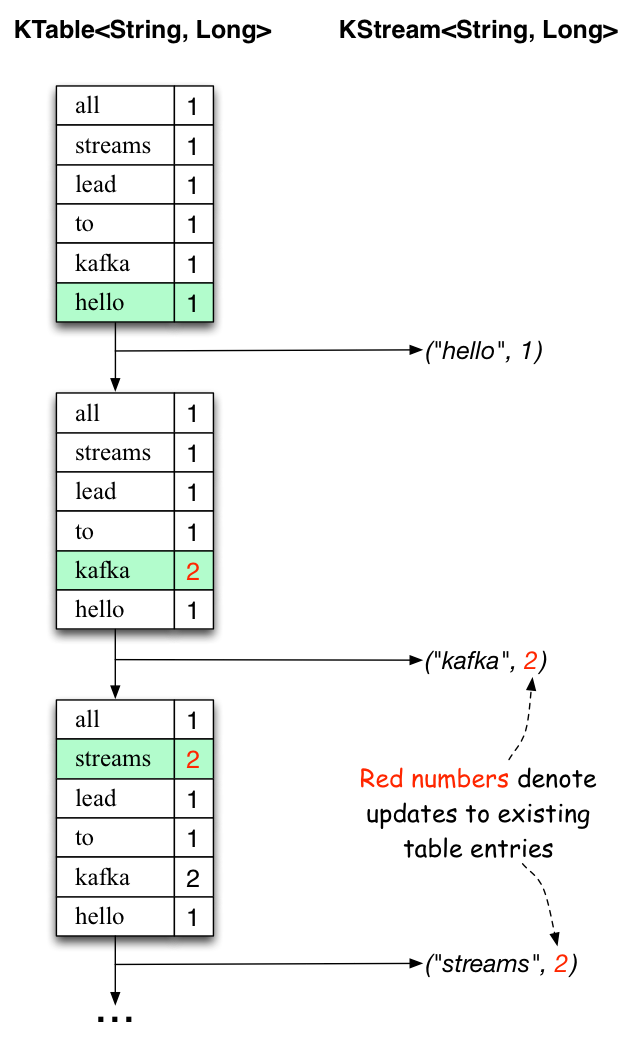
The two diagrams below illustrate what is essentially happening behind the scenes. The first column shows the evolution of the current state of the KTable<String, Long> that is counting word occurrences for count. The second column shows the change records that result from state updates to the KTable and that are being sent to the output Kafka topic streams-wordcount-output.
下面的两张图阐述了背后发生的事情。第一列显示KTable <String, Long>当前状态的演变,它计算count单词出现的次数。第二列显示KTable的状态更新以及被发送到Kafka输出主题streams-wordcount-output的更改记录。
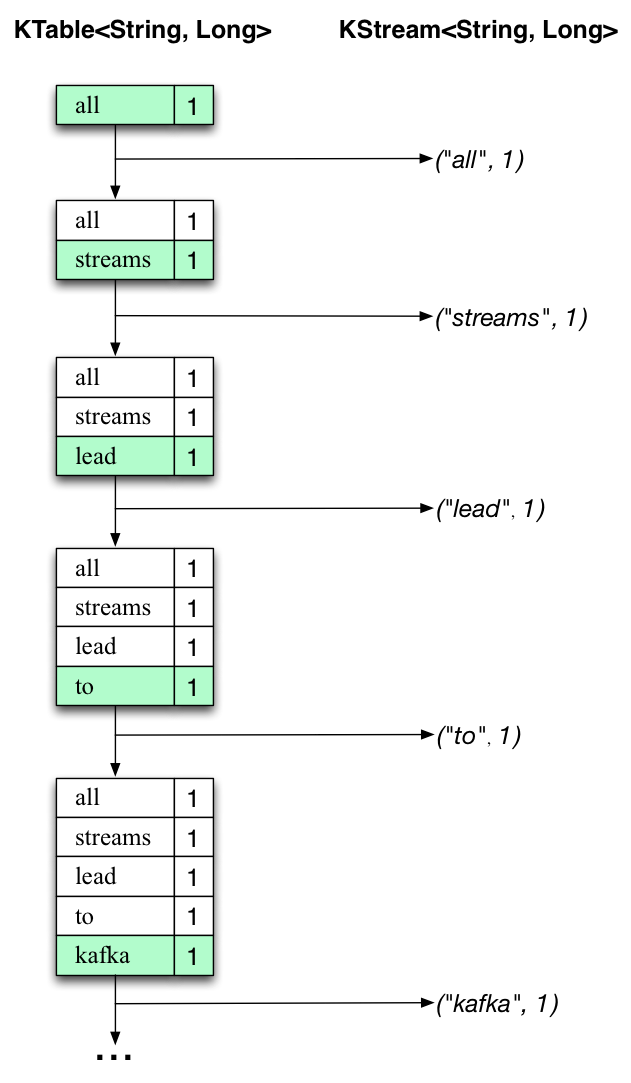
First the text line "all streams lead to kafka" is being processed. The KTable is being built up as each new word results in a new table entry (highlighted with a green background), and a corresponding change record is sent to the downstream KStream.
首先处理的文本行是“all streams lead to kafka”。当每个新单词都生成一个新表格(用绿色背景突出显示),并将相应的更改记录发送到下游KStream的时候,KTable正被建立。
When the second text line "hello kafka streams" is processed, we observe, for the first time, that existing entries in the KTable are being updated (here: for the words "kafka" and for "streams"). And again, change records are being sent to the output topic.
当处理第二行文本“hello kafka streams”时,我们首次观察到KTable中现有的条目正被更新(这里是:“kafka”和“streams”)。紧接着,更改记录正被发送到输出主题。
And so on (we skip the illustration of how the third line is being processed). This explains why the output topic has the contents we showed above, because it contains the full record of changes.
依此类推(我们跳过了第三行如何处理的说明)。因为输出主题包含完整的更改记录,这也就解释了它具有上面显示的内容的原因。
Looking beyond the scope of this concrete example, what Kafka Streams is doing here is to leverage the duality between a table and a changelog stream (here: table = the KTable, changelog stream = the downstream KStream): you can publish every change of the table to a stream, and if you consume the entire changelog stream from beginning to end, you can reconstruct the contents of the table.
从这个具体例子往更高的层面上看,Kafka Streams在这里做的是利用表和更新日志流之间的对偶性(这里:table = KTable,changelog stream =下游KStream):您可以发布表格的任意改变为一个流,并且如果您从头到尾使用整个更新日志流,则可以重新构建表格的内容。
Step 6: Teardown the application
第六步:关闭应用程序
You can now stop the console consumer, the console producer, the Wordcount application, the Kafka broker and the ZooKeeper server in order via Ctrl-C.
您现在可以通过Ctrl-C按顺序停止控制台消费者,控制台生产者,Wordcount应用程序,Kafka代理和ZooKeeper服务器。